--Creating the database for the demo
create database DemoDB
go
--Make sure that the database is in full recovery model
alter database DemoDB set recovery full
go
--Making the first full backup. From now on I can use log backups
backup database DemoDB to disk = 'c:\DemoDB_1.bak' with init
go
--Creating a new object in the database
use DemoDB
go
create table DemoTable (i int)
go
--backup the log
backup log DemoDB to disk = 'c:\DemoDB_1.trn' with init
go
--Inserting a record that doesn't exist in all the backups that were taken into the table
insert into DemoTable (i) values (1)
go
--Creating a second full backup. I won't be using this backup when I'll restore the database
backup database DemoDB to disk = 'c:\DemoDB_2.bak' with init
go
insert into DemoTable (i) values (2)
go
--Creating the second log backup that includes the second record in DemoTable
backup log DemoDB to disk = 'c:\DemoDB_2.trn' with init
go
--Dropping the table (to mimic an error)
drop table DemoTable
go
--Now I'll restore the database. I'll use only the first full backup
--with the 2 log backups. This proves that I don't need to use the
--copy_only switch, if I have a full backup with all log backups that
--were taken since then even if another full backup was taken between
--the log backups
use master
go
restore database DemoDB from disk = 'C:\DemoDB_1.bak' with norecovery, replace
restore log DemoDB from disk = 'c:\DemoDB_1.trn' with norecovery
restore log DemoDB from disk = 'c:\DemoDB_2.trn' with recovery
go
Use DemoDB
go
--Notice that I have the table with 2 records
select * from DemoTable
go
--cleanup
use master
go
drop database DemoDB
Thursday, October 1, 2009

How to know the logical files' names from a database backup?
To use the "move" clause in a restore script, we need first to know the logical files inside the backup. The following sql command can do the trick:
restore filelistonly
from disk = N'the backup location'
restore filelistonly
from disk = N'the backup location'
Thursday, September 10, 2009
How to export from Excel to a CSV file with double quotes on each field
The default "save as CSV" option from Excel does not include any quotes on the fields, therefore a macro is needed in this case:
Sub CSVFile()
Dim SrcRg As Range
Dim CurrRow As Range
Dim CurrCell As Range
Dim CurrTextStr As String
Dim ListSep As String
Dim FName As Variant
FName = Application.GetSaveAsFilename("", "CSV File (*.csv), *.csv")
If FName <> False Then
ListSep = Application.International(xlListSeparator)
If Selection.Cells.Count > 1 Then
Set SrcRg = Selection
Else
Set SrcRg = ActiveSheet.UsedRange
End If
Open FName For Output As #1
For Each CurrRow In SrcRg.Rows
CurrTextStr = ""
For Each CurrCell In CurrRow.Cells
CurrTextStr = CurrTextStr & """" & CurrCell.Value & """" & ListSep
Next
While Right(CurrTextStr, 1) = ListSep
CurrTextStr = Left(CurrTextStr, Len(CurrTextStr) - 1)
Wend
Print #1, CurrTextStr
Next
Close #1
End If
End Sub
The original post can be retrieved here.
Sub CSVFile()
Dim SrcRg As Range
Dim CurrRow As Range
Dim CurrCell As Range
Dim CurrTextStr As String
Dim ListSep As String
Dim FName As Variant
FName = Application.GetSaveAsFilename("", "CSV File (*.csv), *.csv")
If FName <> False Then
ListSep = Application.International(xlListSeparator)
If Selection.Cells.Count > 1 Then
Set SrcRg = Selection
Else
Set SrcRg = ActiveSheet.UsedRange
End If
Open FName For Output As #1
For Each CurrRow In SrcRg.Rows
CurrTextStr = ""
For Each CurrCell In CurrRow.Cells
CurrTextStr = CurrTextStr & """" & CurrCell.Value & """" & ListSep
Next
While Right(CurrTextStr, 1) = ListSep
CurrTextStr = Left(CurrTextStr, Len(CurrTextStr) - 1)
Wend
Print #1, CurrTextStr
Next
Close #1
End If
End Sub
The original post can be retrieved here.
Monday, September 7, 2009
The two most important differences between temp table and table variable
Since this can be one of the mostly asked interview questions, I better have the answers here instead of doing another round of Googling.
1. table variable does not support transaction while temp table does
2. table variable does not support constraints while temp table does
A full expiation is here.
1. table variable does not support transaction while temp table does
2. table variable does not support constraints while temp table does
A full expiation is here.
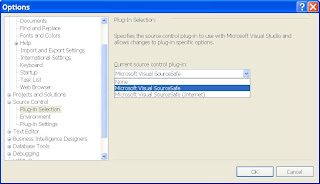
SourceSafe plug-in setting for Visual Studio
This might sound very stupid, but it took quite some time for me to figure out why my Visual Studio failed to connect to our SourceSafe database on which it turns out that the internet connection is switched off by default(On Server, when installing VSS, select Custom Install and make sure you select the "Server Components" or at least the HTTP Remote Access component; they are not installed in Default installation confuguration). While the Visual Studio by default connects to internet SSL connection based database, my multiple attempts failed without providing me too much of a clue since a VNC and a URL in a LAN setting do not vary from each other too much. So after checking an interesting article, the solution is plain simple as shown in the below screen shot in Visual Studio's options.

Subscribe to:
Posts (Atom)


 Posts
Posts


