I am not against Microsoft at all, actually I am pretty much a big fan of MS's products, e.g. SQL Server. But when Windows tries to annoy me with the WGA notification installation wizard, I have to strike back a bit. Here is the link to the video instructions on youtube.
http://www.youtube.com/watch?v=-OaC_9GStUo
Note: this is only for disabling the installation wizard, if you have already installed the WGA notification on your system, then please Google for other solutions.
Friday, July 17, 2009

Monday, July 13, 2009
How to script the schema and/or data from database objects?
Recently, I have been facing an requirement to replicate the same data structure from production to a testing environment in a VM machine. And the data in the production db is too large to be hosed in the VM and only the schema is of more interest for my assignment. Therefore, I did some research into how to actually replicate a database schema from one place to another, which put it another can be referred to as "publishing a database".
A complete answers lies here, but for now I've only tested Microsoft's official "database publishing wizard". Strangely, this wizard does not officially support SQL Server 2008 version yet.
A complete answers lies here, but for now I've only tested Microsoft's official "database publishing wizard". Strangely, this wizard does not officially support SQL Server 2008 version yet.
Friday, July 10, 2009
How to upgrade an expired evaluation edition of SQL Server 2008
I recently tried to upgrade SQL Server 2008's evaluation edition to Developer Edition. Since it has been an expired copy, the upgrade although finished with success, the SSMS still kept popping up expiration message. I later did some research on Google and SQLServerCentral, just to find out that no edition upgrade actually upgrade the SSMS and there is some registry modification need to be done for a workaround. This article from Jonathan Kehayias gives a better step-by-step guide to change the registry and after the change is made, you can use the "Edition Upgrade" function from the "Maintenance" page that you can access from the SQL Server Installation Center. One thing to bear in mind is that you have to change the registry first and then run the Edition Upgrade. The sequence can not be reversed.
Two of the most important screen shots are as follows: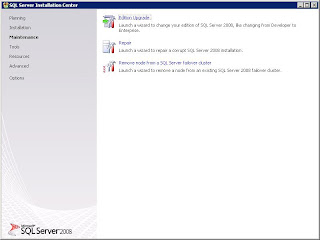


Two of the most important screen shots are as follows:


Monday, July 6, 2009
How to get Windows to manage wireless network
This is a strange issue that I met recently on my company's laptop that every time I wanna configure in the way that Windows is used to manage the wireless network, the tab "Wireless Networks" on the "Wireless Network Connection Properties" window simply disappears; even after several reboots, it refuses to reveal itself.


A quick Google search redirects to a forum post and the solution is pretty simple too: just start the Wireless Zero Configuration service either manually or reset it as automatic.

A quick Google search redirects to a forum post and the solution is pretty simple too: just start the Wireless Zero Configuration service either manually or reset it as automatic.
Monday, June 8, 2009
"cannot drop database because it is currently in use"
A common mistake is usually made when executing the "drop database db_name" statement is forgetting to terminate the current session connected to the target database. A quick solution is to switch to master db and then drop it.
use master
drop database db_name
Most of the time, this can succeed. If the same error message still pops up, disconnect query analyzer or management studio from the SQL Server and reconnect to it and run the above t-sql command again.
use master
drop database db_name
Most of the time, this can succeed. If the same error message still pops up, disconnect query analyzer or management studio from the SQL Server and reconnect to it and run the above t-sql command again.
Subscribe to:
Posts (Atom)


 Posts
Posts


